Protocols,
Tracked and
Understood.
Set up the protocols you're already running, log every dose, check interactions, and watch how your labs respond over time. Ari organizes what you bring it—and tells you what it's seeing.
Performance HQ
Your single entry point for everything performance. Set up a protocol with Ari, import one you're already running, upload bloodwork, and check your doses and interactions — all in one place.
Set Up a Protocol
Organize what you're taking—doses, timing, and cycle length—with Ari guiding every step.
Import Protocol
Already running something? Import it so Ari can monitor interactions, adherence, and how it's working.
My Labs
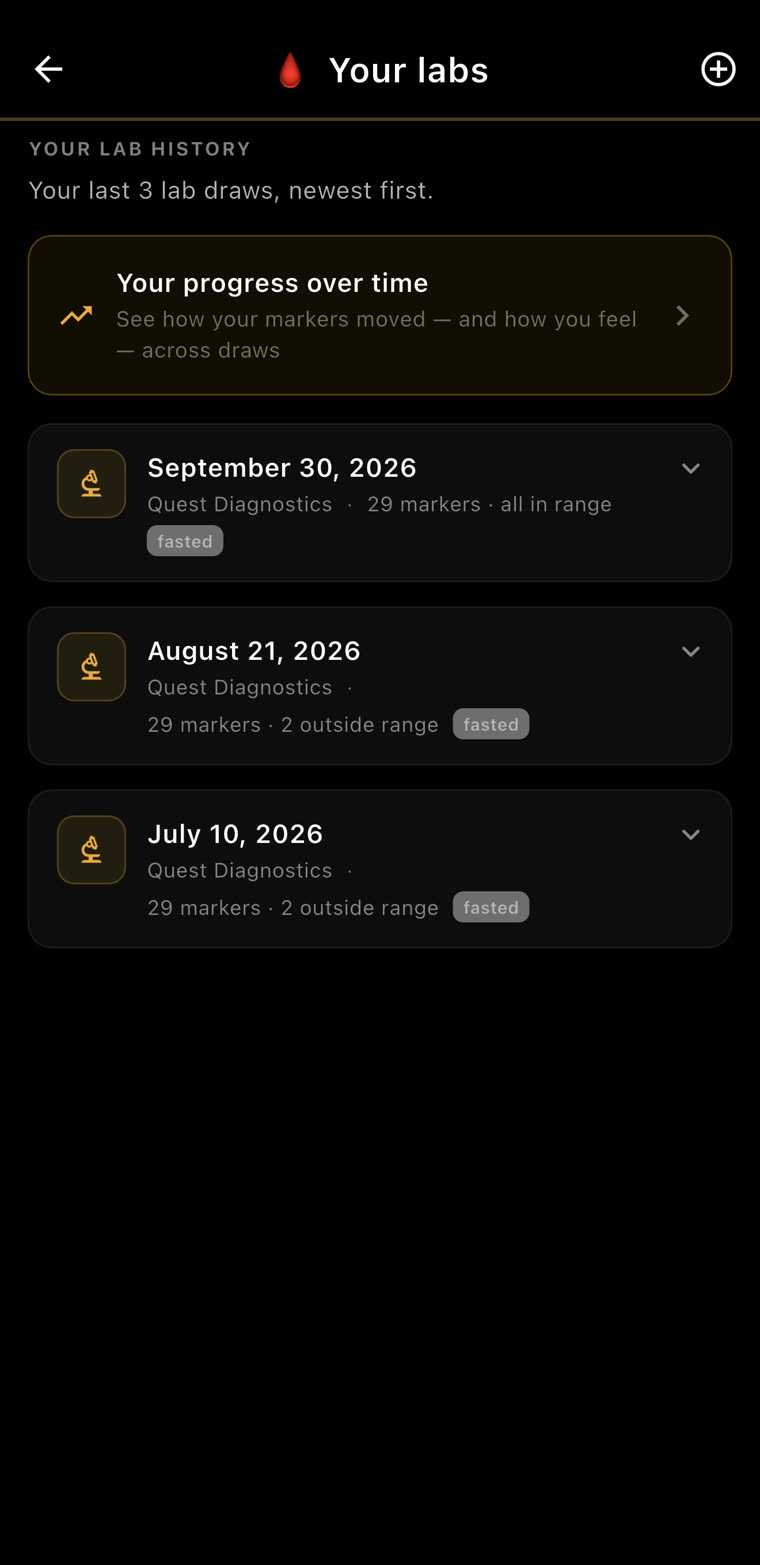
Upload bloodwork, track biomarkers, and let Ari flag anything that needs attention.
Interaction Checks
Ari screens what you're running for known interactions and contraindications, and flags concerns early.
Dosing Calculator
Get your concentrations and per-dose math right for what you're preparing, with step-by-step walkthroughs.
From Setup to Daily Tracking in Minutes
Set your goal and experience level, and Ari helps you lay out the protocol—doses, timing, and cycle length—then tracks it day by day. You see the reasoning at every step.
Build It
Run It
That button isn't advice. It rewrites your macros.
When Ari says “raise protein target +20g”, tapping it changes your nutrition targets right then — not a note to action later, not a reminder in a list. And it rebalances carbs and fat around the increase so your calorie target stays where you set it.
The suggestion carries its reason. Your protein has held around 178 g/day since this protocol started, down from 191 — a bump supports lean mass while you run it.
One tap and the targets move. Protein 155 → 175g. Carbs and fat rebalance underneath it.
Calories hold. 2801 → 2802 kcal. A one-calorie drift across a twenty-gram protein change — because the point was to shift the composition, not to quietly put you in a surplus.
And it's on the record. The change lands in your macro history in the You tab with who made it, when, and why — next to any edit you made yourself.
Every Dose, On Schedule
Whatever you're running, Ari lays out the schedule—doses, timing, and what to watch for—then tracks every administration and flags anything that looks off.
Build It
Not a calculator. A catalog that does the math.
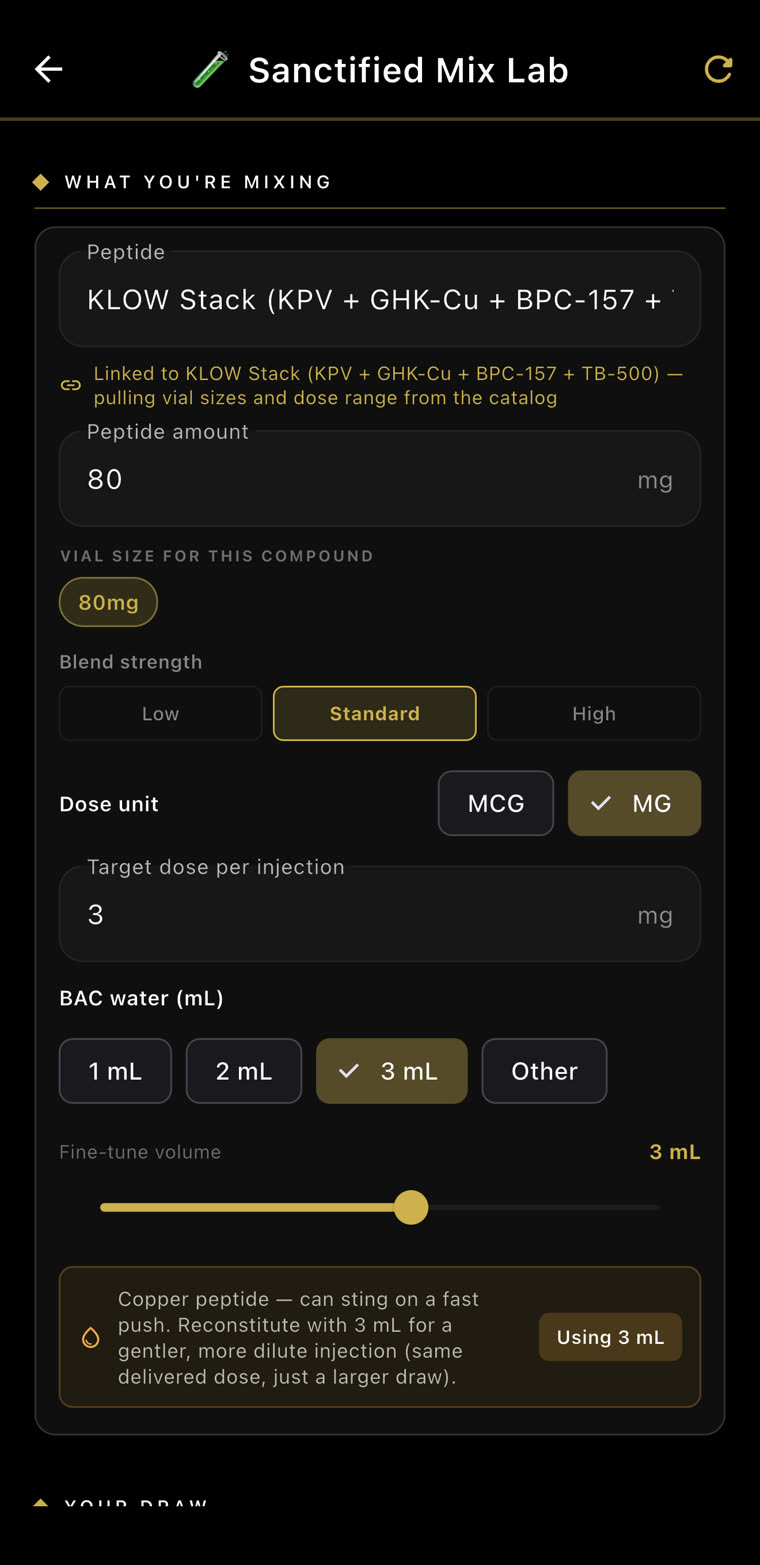
Most reconstitution tools are an empty box you type numbers into — and they will happily let you draw a dose nothing supports. The Mix Lab is wired to the compound catalog, so vial sizes and dose ranges arrive already known.
It already knows the vial
Pick the compound and the Mix Lab pulls its vial sizes and dose range straight from the catalog. Set your BAC water and the syringe scale moves with you — down to the unit mark you'll actually line up.
And checks every compound in it
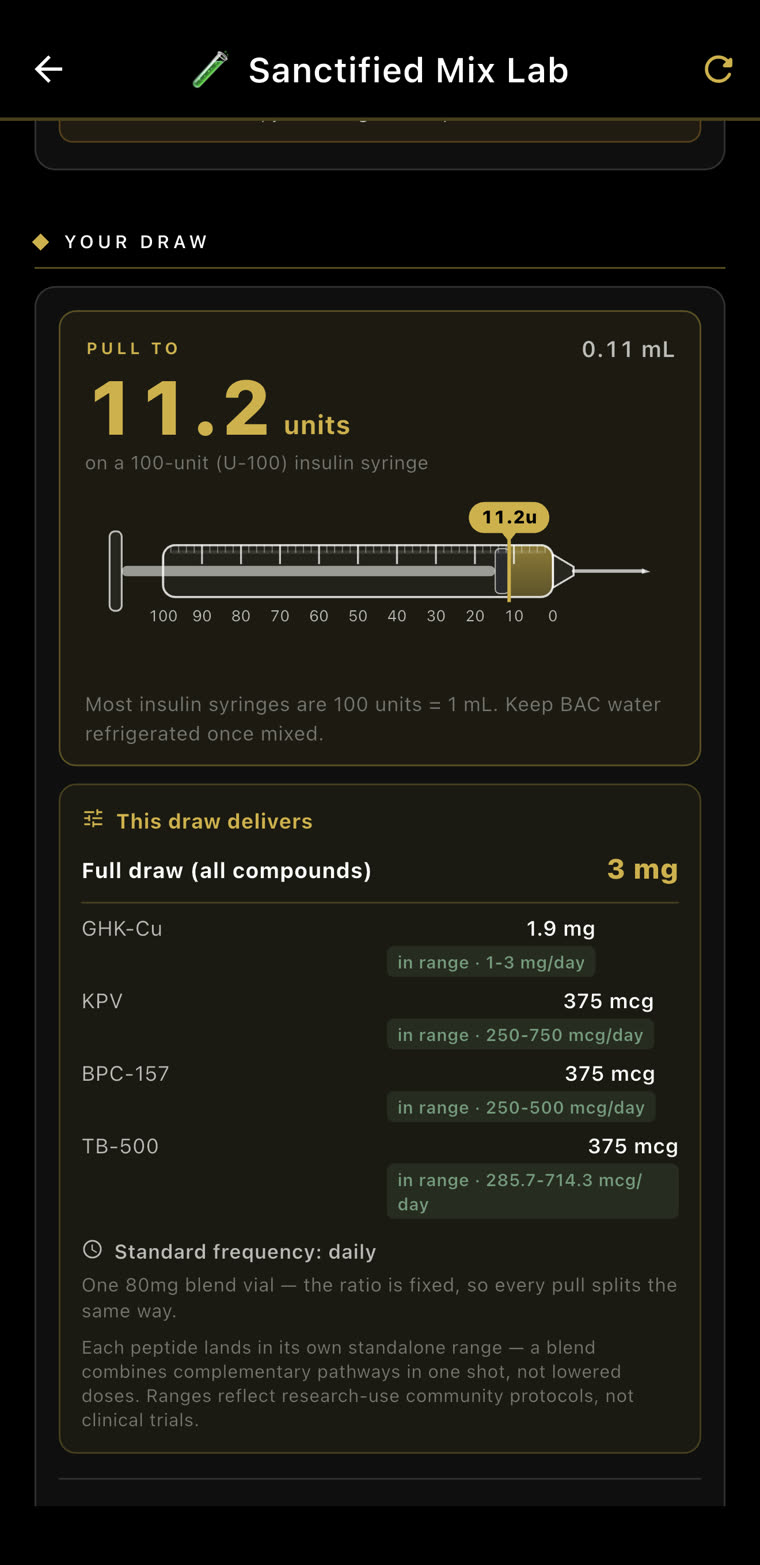
You get the exact draw — units and millilitres — plus what that single pull actually delivers of each peptide, every one marked against its own documented daily range. On a blend, that is four range checks from one number.
And it tells you where those ranges come from: “Ranges reflect research-use community protocols, not clinical trials.” Stability window and storage are on the same screen. Research use only.
Browse by goal, not hype.
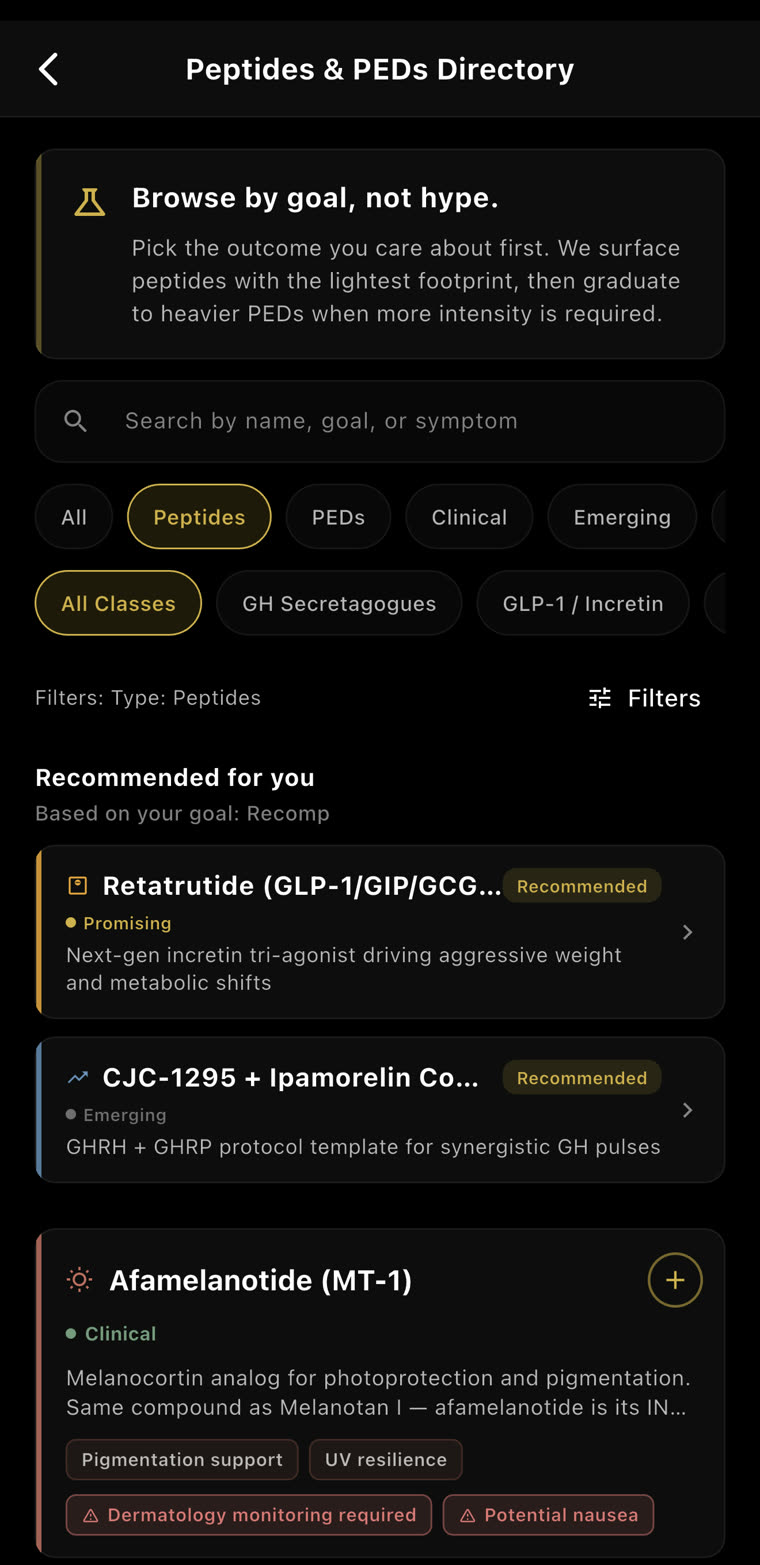
The same catalog the Mix Lab reads from is one you can search — by name, by goal, or by symptom. It surfaces the lightest option that fits first and only graduates to heavier compounds when the goal genuinely calls for it.
Matched to your goal
Filter by class or search by the symptom you're chasing. Entries are ranked against the goal you already set, and each one carries how strong the evidence behind it actually is.
Including what's wrong with it
Every entry carries its risks in red next to its benefits — experimental evidence, requires medical supervision, prescription required. A catalog that only lists upside isn't a catalog, it's an advert.
Ask it anything. It answers from the same catalog.
Ask a general assistant about a four-peptide blend and you get a refusal, or a paragraph of hedging that answers nothing. This is an open conversation about exactly these compounds — grounded in the same database the Mix Lab draws on, and in what you're already running.
It answers from your database, not the internet. Dose ranges come back cited as what's documented — low, standard, high — the same numbers the Mix Lab checks your draw against.
And it knows what you're already on. Ask whether a stack makes sense and it looks at what you've actually logged and when — then tells you the blend would overlap what you're running rather than adding anything new.
It names the cautions. Contraindications, what to monitor, and when to recheck — pulled from the catalog rather than improvised.
Then it refuses to decide for you. “The right personal protocol is a provider conversation rather than something I'd convert into a recommendation for you.” The exchange ends flagged for provider review.
It's a real conversation, not a menu. No canned prompts, no approved list of questions. Ask about mechanisms, sides, timing, stacking, what to watch for, or what a number in your own panel means — in your own words, for as long as you want. In the clip, “dumb it down for me” is simply typed, and the whole answer is rebuilt in plain language.
And it doesn't pretend the subject doesn't exist. Most assistants shut down the moment you name a compound, which leaves people reading forum threads instead. Ari was built for this material and will discuss it properly — the mechanisms, the evidence, the risks — and then still point you at a qualified provider for the decision. Engaged, not unguarded.
“In Range” Is a Population Floor
A lab report can call you normal while you feel like hell. This is a real panel — 57 markers, 11 flagged — and what matters is what happens next: Sanctify reads all of it at once, against everything it already knows about you.
It asks before it reads.
A number on its own means very little. Sanctify starts with why you tested and how you actually feel — then reads the panel against that, and against everything you've already logged.
Why did you test? “The reason matters more than the numbers.”
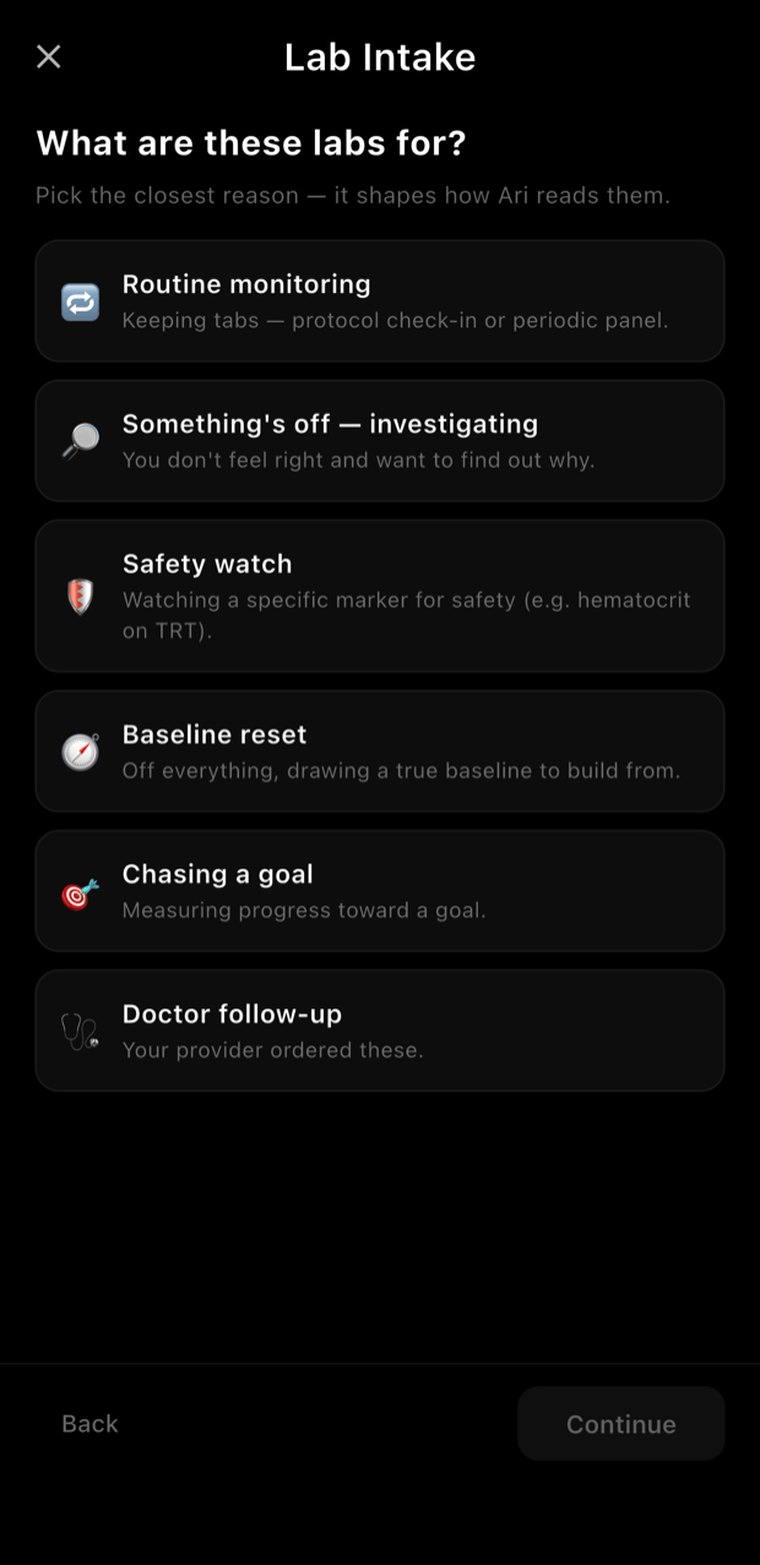
It changes the reading. Routine monitoring, a safety watch, a baseline reset and “something's off” are four different questions — so they get four different answers from the same panel.
And how you actually feel. “Symptoms are the primary signal. A ‘normal’ number with symptoms is not normal.”
“That range is a population floor, not your personal target.”
Before it reads a single number, Sanctify asks why you got the panel and how you've been feeling — because the same result means something different for routine monitoring than it does for someone investigating why they feel wrong.
Then it brings everything it already holds: what you've eaten, how training has actually gone, your sleep, and every medication and compound you've disclosed. Contraindications get flagged against what you're running. The whole panel gets read at once and explained in language a person can use.
And every marker that's either out of range or could plausibly explain a symptom you've logged gets opened up further — ordered by what actually matters first. Sanctify organises and contextualises. It does not diagnose, and it says so on the screen: talk to a qualified healthcare provider.
One Marker, All Your Context
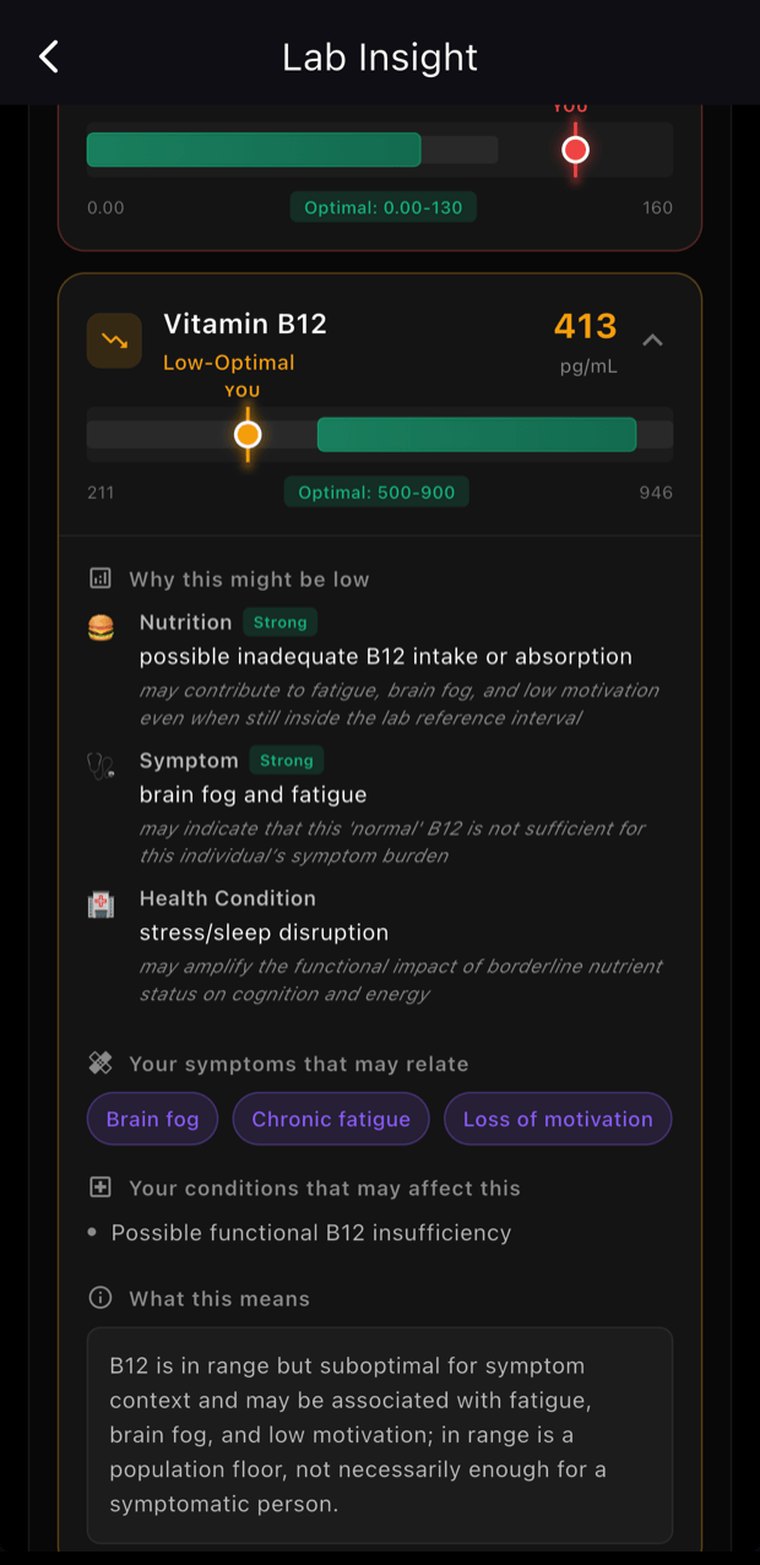
Tap any marker and it explains itself — weighed against your intake, your stress load, your training, your logged symptoms and what you've taken before. Not a number with a colour. A situation.
It Sends You to a Doctor
And prepares you for the appointment — which kind of specialist to see, what timeline to bring, and the specific questions to ask. The difference between being heard and being told you're fine.
In Range Isn't Always Enough
A marker can sit inside the reference band and still be flagged, when what you've logged says it isn't serving you. “In range is a population floor, not necessarily enough for a symptomatic person.”
And then it builds from them.
The panel isn't a dead end. Flagged markers, your symptoms and your history become a starting protocol you can edit compound by compound — named, in this case, Recovery — from your labs.
Ari Doesn't Just Track. He Thinks.
Every protocol is monitored by the same 7-layer AI brain that powers the rest of Sanctify. Side effects flagged. Interactions checked. Effectiveness measured at days 7, 14, 21, and 30.
Interactions Screened
Everything you're running is screened against itself and your medications for known interactions. Contraindications respected.
Cycle Awareness
Ari understands on-cycle and off-cycle phases and shifts what it watches for as your protocol moves through them.
Ari Commentary
Not just dosing — Ari explains WHY each compound was chosen, what to watch for, and how to optimize.
Effectiveness Scoring
Protocols measured at 7, 14, 21, and 30 days against your baseline. Ari adjusts recommendations based on results.
Lab Integration
Upload bloodwork. Ari tracks biomarkers over time and flags anything that deviates from your baseline.
Side Effect Monitoring
Daily check-ins track side effects. Ari knows when something is off and recommends adjustments or discontinuation.